
Deposit and Withdrawal Guide for JJwin Game
Managing your funds on JJwin Game is simple thanks to local wallet support. This page covers both deposits and withdrawals in detail, along with a few safety tips worth knowing.
How to Deposit Money
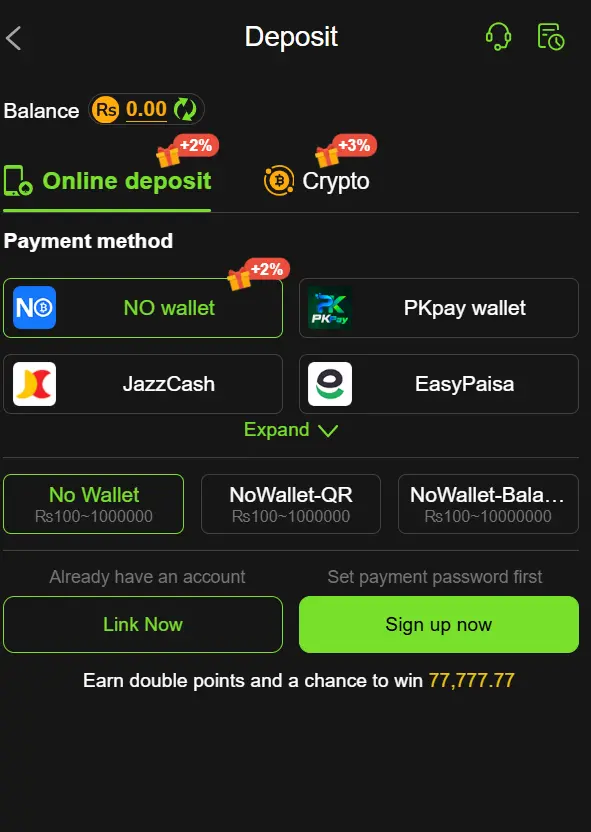
- Log in and go to the Deposit section.
- Select JazzCash or Easypaisa.
- Enter your desired deposit amount.
- Confirm the payment through your wallet app.
- Your balance updates within a few minutes.
Tip: Always deposit using a wallet registered in your own name and CNIC. Deposits from someone else’s account can create verification problems later when you try to withdraw.
JJwin Deposit Limits
| Deposit Details | Limit |
|---|---|
| Minimum Deposit | PKR100 |
| Maximum Deposit | 100000PKR |
| Payment Methods | JazzCash, Easypaisa |
| Deposit Frequency | Subject to platform rules |
| Processing Time | Depends on transaction status |
How to Withdraw Your Winnings
- Go to the Withdraw section.
- Set up a withdrawal password if this is your first time (a one-time security step).
- Link the JazzCash or Easypaisa wallet you want funds sent to.
- Enter your withdrawal amount.
- Confirm using your withdrawal password.
- Funds typically arrive within a short window, though busier periods can occasionally slow things down.
JJwin Withdrawal Limits
| Withdrawal Details | Limit |
|---|---|
| Minimum Withdrawal | 100PKR |
| Maximum Withdrawal | 50000PKR |
| Withdrawal Methods | JazzCash, Easypaisa |
| Daily Withdrawal Limit | 100000PKR |
| Processing Time | Depends on Wallet type |
JJwin Withdrawal Requirements
Before requesting a withdrawal, review these important details:
- Account Information: Make sure your personal and account details are correct.
- Wallet Ownership: Use a wallet registered in your own name.
- Withdrawal Limits: Check the minimum and maximum withdrawal amounts displayed in the app.
- Bonus Conditions: Promotional rewards may have wagering requirements or separate withdrawal restrictions.
- Transaction Status: Check whether an earlier withdrawal request is still pending before submitting another one.
Meeting these requirements can help you avoid unnecessary problems when managing your JJwin balance.
Common Deposit and Withdrawal Issues
- Delayed deposit: double-check the wallet number entered was correct, then contact support with your transaction ID.
- Withdrawal stuck: make sure your CNIC details match your wallet registration exactly.
- Wrong amount entered: contact support immediately before the transaction fully processes.
For a full look at responsible spending limits, see our Responsible Gameplay page before making your first deposit.
How to Check JJwin Transaction Status
Have you completed a deposit but your balance has not changed? Or is your withdrawal request still pending? Check your transaction history before making another payment request.
Open the wallet or transaction history section in your JJwin account and look for the latest deposit or withdrawal record. Compare its amount and status with your JazzCash or Easypaisa receipt.
If the transaction remains unresolved, contact the platform’s official support channel and provide the transaction ID, payment amount and relevant receipt. Never share your wallet PIN or OTP during a support conversation.
Faqs
How can I deposit money into JJwin using JazzCash?
Log in to your JJwin account, open the Deposit section and select JazzCash if it appears among your payment options. Enter the required amount, follow the displayed payment instructions and save your transaction receipt.
Does JJwin support Easypaisa withdrawals?
Easypaisa can be used for withdrawals methods in your JJwin account. Select the option, enter your correct wallet details and review the withdrawal limits before submitting your request.
What should I do if my JJwin deposit is not credited?
First, check your JazzCash or Easypaisa transaction history to confirm whether the payment was successful. Save the transaction ID and receipt, then contact JJwin’s official support channel with the payment details. Avoid sending the same deposit again until the earlier transaction is resolved.
Why is my withdrawal request pending?
A withdrawal can remain pending because of transaction processing, account verification or incorrect payment details. Check your withdrawal history and review any outstanding requirements. If the status does not change, contact official support with your withdrawal reference number.